
PC Building Tips.
To build a PC is to risk a lot of money on something that might not live up to your expectations. So it's no wonder that my first piece of advice is to get advice. I've helped a lot of people build PCs by now, and I have a bunch of little tips that, crucially, doesn't seem to get around too much. In other words, these are my personal tips.
I always wanted to scream them into the void. Thus, a page of things to worry about for people building a PC. This is best used after you have a basic parts list, but before you've made any big commitments. Don't be afraid to go against these if you feel strongly about something - my words are not the gospel on PC Building. But... at least hear out my reasoning for things.
...please?
Lists Expire.
In terms of those premade parts list thingies, please make sure they're up to date. Do not follow 2023 FASTEST PC BUILD UNDER $1000 right now, because that's out of date (Notice the 2023!). In fact, your threshold should be that the parts list is no more than six months older than when you plan to build it - these things really do move fast these days, and it hurts to have missed out on something nice.
Never throw hardware at a software problem.
I once knew someone who threw away a 2070 Super in 2021, before the 30 series had even come out, just to try and get better performance in Arma 3.
Arma 3.
For those that aren't in the know, I would be surprised if they got 5 extra frames. Arma 3 is not exactly known for being well optimized. Let this be a cautionary tale: Don't polish turds. Don't throw hundreds of your own dollars at the developer's mistakes. If the game runs poorly, I can nearly guarentee you that it will continue to run poorly on newer hardware. It's even worse if they do fix the performance issues - rendering your purchases pointless!
This also goes another way: Don't built uselessly powerful PCs. Build for what is necessary to do what you want to do, plus some wiggle room. Never try to add power to "account for future games". You probably won't be able to run them anyways, becuase top-of-the-line parts scale very poorly.
In 2013, you could buy a GTX Titan for ~$1,400. Only three years later, you could buy a GTX 1060 for ~$400.

Ahem. Yeah.
I bet you'd regret being that GTX Titan guy.
And just a reminder, the 1060 was on the low-end of cards released in 2016.
You need games with your PC, silly.
Set aside some of your budget (or expand it a bit) to actually buy games for that dang expensive PC you just built. Seriously. It's embarrasing how many people build PCs for 15-game Steam accounts. I'm not saying to buy stuff you won't play, but at least have some variety. Give your new PC new games to make it feel new, don't just fall back to what you previously did with more horsepower this time.
The stuff inside the computer is only the start.
Please, actually consider your peripherals for a moment:
- You've bought and built a $2,000 PC, and now you're forced to type on some $10 keyboard that looks straight out of the computer lab at the local elementary school?
- You plan to be on it for hours... and yet your chair is some random piece from an antique store that's not comfortable at all?
- "Headphones? Yeah, I've already got some." They will then proceed to pull out something straight from a call center. It uses a 3.5mm jack on a tiny, thin wire of course.
- And my personal favorite, plugging an RTX 5070 into a "monitor my dad got from work that they gave him for free". Really great refresh rates on that one, I bet.
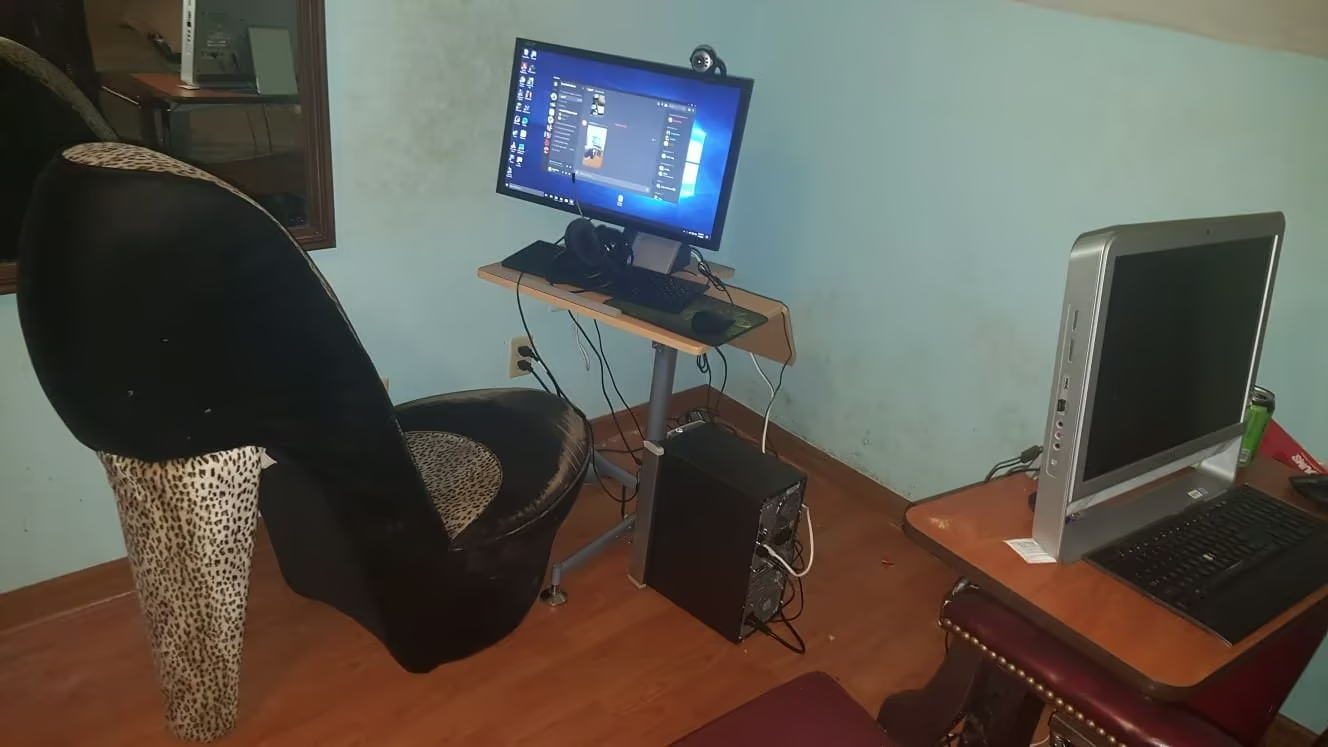
Don't be this person. It seems so easy to not be this person. And yet, you would be surprised. Thus, take my warning:
Don't be this person.
Don't count your parts before they hatch.
In the same lieu as not using a really old parts list, don't build your PC more than a month or so ahead of when you plan to buy it. If you do, you can end up with problems where savings then aren't really savings now, and parts you needed are now out of stock. You really need to make any parts list in one big "sweep", not doing some parts then hibernating on it, then finally getting around to doing some other parts way later.
In short, you end up chasing your own tail and having to "redo" areas of your list. Because how do you know if it's still the best deal? Or still going to be in stock when it's time to buy? Or still compatible with some other change you made two weeks after that?
Back up your stuff.
Okay, so. You're messing with your computer, and you accidentally delete something you wanted to keep. Maybe it was all of your files, maybe it was just one save file you have 30 hours in. Messing with partitioning, DELTREE, or malware, it doesn't matter how or why. You just want that stuff back.
So, here's the immortal question I always have to ask people who just had something like this happen: Did you back it up?
Because backing things up is actually a big problem you need to address when building your PC. Most people think they can just back up their stuff to somewhere on the cloud. But most people don't have the internet for that. Even if it's hypothetically fast enough to get it over in a reasonable amount of time, remember that uploading something at 100% bandwidth usage might just bring the entire network to a standstill from the point of view of everything else. So, amongst other issues with it, trust me when I say that's not nearly as practical as it sounds.
What I recommend for most people is to actually include a basic hard drive with their build. It really doesn't have to be anything special in terms of performance, just make it ~50% larger than the largest amount of storage you see yourself using. Then, just use it as a local backup target for something like Kopia.
Doing this means that you no longer need to screw with the internet and limited bandwidth to perform backups, and that there's no subscription fees or worry about where your stuff is going. It never leaves your box, it's in an easily accessible format, and unlike some snapshotting stuff, it can also survive total SSD hardware failure.
Really though, you should just back up your stuff. Somehow. I don't really care how you want to, just do it.
Glass Breaks.
Almost everything is Single-Threaded.
This is a pretty controversial topic, and just to be clear, this is going to be a pretty big simplification. To start, I'm going to need to cite something:

This is a graph of frames per second in Rainbow Six Siege. On the top, we have the 7950X, and on the bottom, we have the 7600. The 7950X is basically just the 7600 with more threads.
Notice how the difference sucks. Like, really badly. Check the blue bars: you barely get 5 extra FPS on average out of 600 or so. And the 7950X costs an extra $470 compared to the 7600, by the way.
Again, huge simplification of a complex topic, I can't get into the weeds on this without it being another article. These results won't be true for all games, so on and so forth. But if you're going to be building a PC for anything vaguely like "general gaming", you don't need high thread counts.
Games and most software really just don't make use of copious amounts of them. It pains me every time I see a Dad with a "just got into gaming lol!" build with a 7950X. It's totally unnecessary, just save your money. I do a ton of stuff with Emulation, VMs, Software Development, and Video Transcoding on the CPU, and yet I've never felt any reason to upgrade from my 7600.
...and some rapid-fire miscellaneous tips.
- You don't need to shop for Motherboards with Wifi built-in: you can always just add it later with a USB dongle or a PCIe card.
- Regarding any part, don't cheap out too much. Don't buy the absolute cheapest SSD or motherboard, it will come back to bite you.
- The drive you install your OS on should be an SSD. Full stop. Going forward from 2025, there is basically no reason for a Hard Drive for this.
- Your monitor will be the only way you will ever see what pretty pictures your expensive GPU can draw for you - please make sure it's good too.
- In a financial pinch, second hand works. It'll be less reliable, but there are genuinely some good deals to be made, especially at places that recycle electronics.
- If you're still unsure of making the purchase, you can try posting your build to PC building communities to see if they'll glance over it and spot any obvious issues. Don't worry, you're unlikely to be roasted.
A conclusion...
Mahatma Ghandi
Thanks for the input, Ghandi. So basically, what he's trying to say is that if you can build a PC, then you're like really attractive and cool and normal.
Also, I'm out of tips. But hopefully some of these helped you!